Don't Panic! 4 Simple Cybersecurity Rules for Everyday Users
Don’t Panic!

This is a spontaneous piece of writing, but you’ve probably noticed there have been way too many cyberattacks recently, especially in Japan, where I’m based (Nikkei: Companies that have disclosed personal data leaks, updated regularly). The recent trouble surrounding PHP (two critical flaws dubbed PHP2Shell, which could let attackers run their own code on a vulnerable web server without even logging in) has left a huge number of sites and services scrambling to patch.
As a result, multiple friends and colleagues have reached out to me as “someone who knows a thing or two about cybersecurity”, anxious about the state of things and how to protect themselves. I’ll be honest: part of the reason I’m writing this is so I can just chuck them a link going forward. For context, I have recently moved into a new position doing vulnerability assessment, but I spent the past three years writing cybersecurity e-learning content for end-users as part of Selphish, a product operated by my employer, Kobe Digital Labo. I also keep on top of attack trends through working on KDL’s Computer Security Incident Response Team (CSIRT).
“Don’t Panic” is a nod to The Hitchhiker’s Guide to the Galaxy. It’s true that, with advances in AI and companies’ widespread poor security, it’s a messy galaxy out there at the moment. But the average person should remember that, beyond following four simple rules (which I’ll lay out in this article), there’s only so much you can do. You aren’t responsible for the security posture of the services you use, and it’s on companies to properly secure their platforms, even if, as you’ll see below, it pays to take matters into your own hands where you can.
Why is this happening?
Barring some hacktivists and nation-state actors, cyberattackers are in it for the money, and recent advances in artificial intelligence have shifted the economics in their favour. Stolen login credentials sell cheaply on the dark web, ransomware crews run “ransomware-as-a-service” businesses complete with customer support desks, and the internet is full of low-hanging fruit in the form of improperly maintained systems.
AI can read code, spot likely weaknesses and draft working attacks in a fraction of the time it once took skilled people, shrinking the window between a flaw becoming known and being exploited. PHP2Shell shows how quickly that window can close: the PHP team was working towards a coordinated patch and release, but details leaked days before the planned disclosure and exploitation attempts quickly followed, forcing them to rush the fixes out.
Unfortunately, the halcyon days of scams being easily recognisable have been brought to an end by AI. Phishing emails can now be written fluently in any language (including Japanese, which used to be a decent barrier for international attackers), and cloned voices and deepfake video make “a call from a relative in trouble” or “a message from your boss” worryingly convincing. Defenders are using AI too, but it feels like an endless game of whack-a-mole.
Four simple rules
The good news is that just four simple rules cover the vast majority of the risk. None of them will make you invulnerable. The real goal is to make you a harder and less rewarding target than the next person, which is how most attackers choose their victims. (So you should be OK unless someone really has it in for you.)
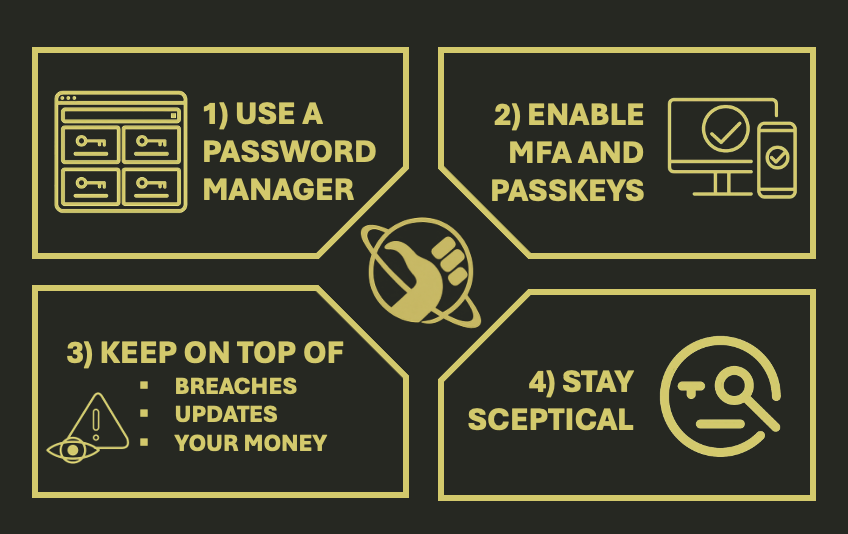
Rule 1: Use a password manager effectively
We humans, with our monkey brains, are terrible at creating and remembering unique passwords, so stop trying. A password manager does it for you: it generates a long random password for every account (e.g. zD#UEEjHdGX$V!FzFF8Y, much stronger than Shuggy123!), fills it in when you log in, and leaves you with a single master password to remember. Bitwarden, 1Password and Proton Pass are all well regarded, and are worth considering over the managers built into your phone or browser. KeePassXC is a solid free, open-source alternative.
Using one effectively comes down to a few habits:
- Never reuse a password. When a site is breached, attackers try the leaked email and password pairs everywhere else, an attack called credential stuffing. If you use
Shuggy123!for your Gmail, your online banking and an e-commerce site, and that e-commerce site is breached, the attackers now have your email and your bank account too. A unique password per account keeps a breach contained. - Make the master password strong and unique. Use a long passphrase of several random words, and don’t use it anywhere else. It’s the one password you do have to remember.
- Protect the manager itself. Turn on MFA for it (see Rule 2) and keep its recovery details somewhere safe, offline if you can.
- Migrate methodically. Start with your email, since it can reset everything else, then banking and anything that stores payment details, and work through the rest as you log in to them.
Rule 2: Use MFA and passkeys as much as you can
Multi-factor authentication (MFA) means a stolen password alone isn’t enough to get into your account. Turn it on everywhere that offers it, starting with email, banking and your password manager. Prefer an authenticator app or a physical security key over SMS codes, which can be intercepted through SIM-swapping, and keep your recovery codes somewhere safe, or you may lock yourself out.
Passkeys go a step further by replacing the password altogether. Your device or password manager holds a cryptographic key, unlocked with your fingerprint, face or PIN, and it only works on the genuine site, so it can’t be phished and there is nothing for a breach to leak. The catch is that you become responsible for protecting wherever your passkeys live. Given how often service providers get breached, though, taking that responsibility away from them and doing it yourself seems like the better bet. So whenever a service offers to create a passkey, say yes, but make sure you are securing the device or password manager they live on properly.
Rule 3: Keep on top of breaches, updates and your money
Breaches: Dark web monitoring sounds dramatic (or cool as hell, depending on who you ask), but the useful version is free. Sign up to a service like Have I Been Pwned, which emails you when your address appears in a known breach, and change the affected password straight away. There’s no need to pay for it. Once your email address or phone number has leaked, also expect an influx of phishing emails and scam calls, so stay extra sceptical (see Rule 4).
Updates: Many successful attacks exploit flaws that already have a fix available. Turn on automatic updates for your phone, computer, browser, apps and, easily forgotten, your home router. PHP2Shell is a good reminder: the servers behind the sites you use are somebody else’s job to patch, but the devices in your hands are yours.
Your money: Use a credit card rather than a debit card for online purchases, so your own money isn’t directly on the line when something goes wrong. Turn on instant transaction notifications in your banking app and check your credit report occasionally (in Japan, you can request disclosure of your own record, for a small fee, from credit bureaus such as CIC; I recently started using their service myself after the wave of breaches).
Rule 4: Have a healthy sense of scepticism
Most attacks still need you to click, download or hand something over, so treat anything unexpected with suspicion, especially if it creates urgency. That goes double for phishing emails and scam calls, which will only get more frequent and convincing after a leak (see Rule 3). Verify odd requests, even from people you know, by contacting them another way.
Fake software links deserve special mention, because they catch out even careful people. Attackers pay for search ads that sit above the real download page for popular software, and the cloned sites behind them hand out malware, adware and other assorted nasties. In an ideal world, Google et al. would keep malicious results out of their ad programmes, but, as ever, it pays to look after yourself.
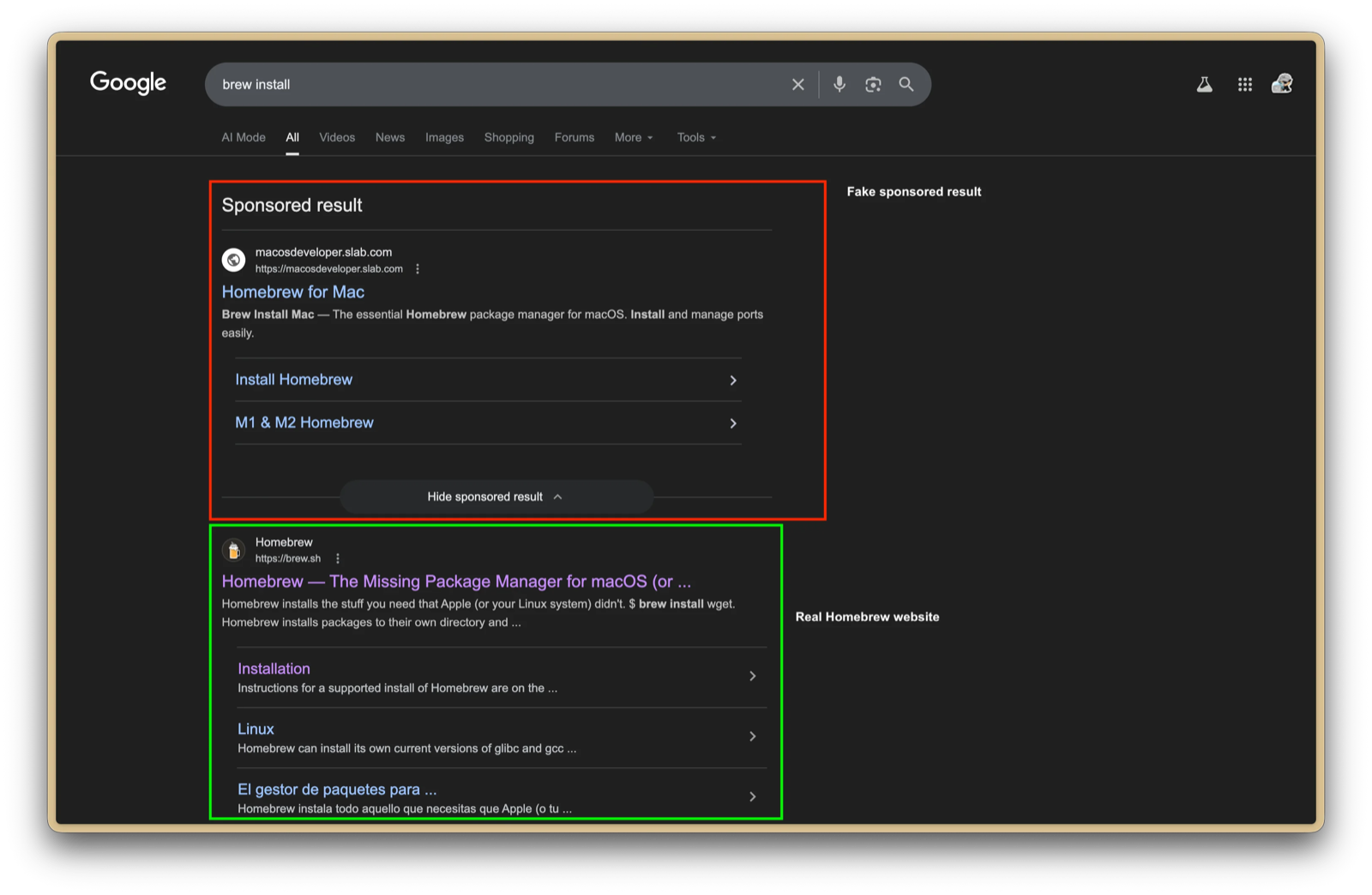
Screenshot by Reddit user u/Maxdme124. A fake sponsored result for Homebrew sits above the real site, and it led to a malicious command that would install an infostealer on macOS.
Get software from official app stores or by typing the vendor’s address yourself, rather than trusting whatever tops the search results.
The same goes for security products. “Military-grade” encryption (if you know anything about military procurement, lowest bidder always wins), “unhackable” VPNs and paid dark web scanning mostly promise far more than they deliver, and merely want to sell you a sense of security. The four rules cost very little and do far more.
In conclusion
A lot of this seems really self-explanatory, especially if you are in the cybersecurity industry, but a 2026 Trend Micro survey found that 84.3% of people in Japan still reuse passwords across multiple services, and that the most common way of managing them is simply memorising them, so it clearly bears repeating.
None of it is glamorous, but a good password manager, a second lock on every door, a bit of digital housekeeping and a healthy dose of cynicism cover most of what matters. Whilst these rules don’t solve everything, they are a solid foundation to build on.
Remember, you can’t make yourself completely immune to cyber-threats, and the companies holding your data will keep getting breached through no fault of your own. These rules just make sure that when it happens, it costs you an annoying afternoon of changing passwords and not a drained bank account, and that you’re a less tempting mark than the next person.
AI disclosure: This post is written in my own words. AI tools were used sparingly — to smooth over awkward phrasing, tidy up formatting, and help the Japanese version read more naturally — but not to generate original content or for bulk translation.